Sifu can suffer from FPS drops, stuttering, freezing or crashes on Windows 11/10. FPS drops and stuttering are related performance problems that can occur when the computer cannot handle its workload. Background applications, including Chrome and Discord, can contribute even if they do not appear demanding.

Work through the following fixes to reduce system load and address other possible causes.
Restart before opening Sifu
If performance problems keep returning, restart the PC before launching the game. This closes running applications and processes that may be contributing to the issue, giving the game a fresh start.
End resource-heavy tasks
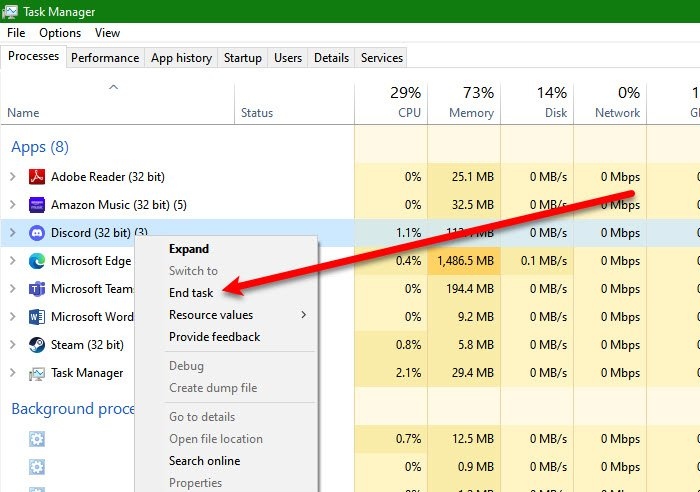
If you would rather not restart, open Task Manager. Right-click tasks or processes consuming CPU and GPU resources, then choose End Task.
Update graphics drivers
An outdated graphics driver can cause graphically demanding games to freeze or crash. Update it using one of these methods:
- Check Windows for updates to update drivers.
- Use Device Manager to update the Graphics Driver.
- Download the latest driver from the manufacturer’s website.
Reduce graphics and video settings
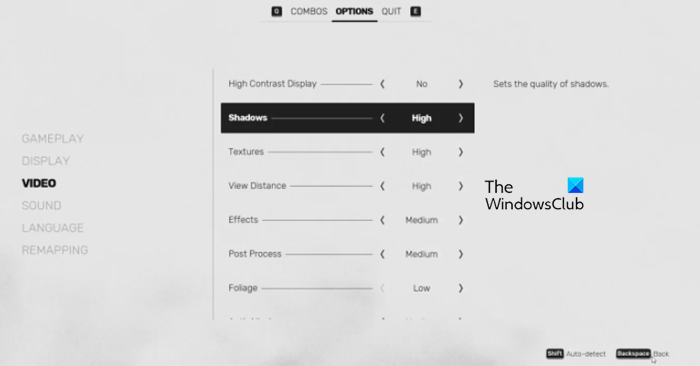
Lower settings such as FPS, Graphics, Textures and Shadow, or turn them off where possible. Maximum settings increase the computer’s workload and can cause freezing or stuttering, particularly on older hardware such as a 3rd-generation processor.
Verify the game files
If Sifu is not crashing, you can skip this step. Otherwise, use Epic Launcher to scan for corrupted files and repair them:
- Open Epic Launcher and navigate to Library.
- Find the game and select its three-dot menu.
- Choose Verify to begin checking the game files.
Choose a performance-focused power plan
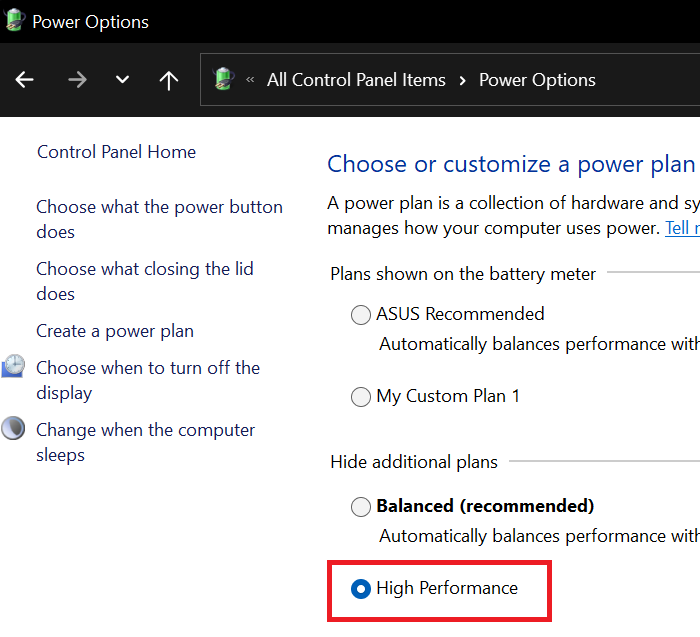
Windows performance modes prioritize CPU and GPU performance over battery life. To select one:
- Open Control Panel.
- Change View by to Large icons.
- Open Power Options.
- Choose Ultimate Performance or High Performance.
Recommended system requirements
Check your computer against Sifu’s recommended specifications:
- CPU: AMD FX-9590 or Intel Core i7-6700K or equivalent
- RAM: 10 GB
- OS: Windows 11/10
- VIDEO CARD: GeForce GTX 970 or Radeon R9 390X or equivalent
- FREE DISK SPACE: 22 GB
- DEDICATED VIDEO RAM: 4096 MB.