Players report that Star Citizen sometimes crashes, minimizes, stutters or freezes on Windows PCs. Possible causes include hardware that does not meet the requirements, outdated graphics drivers, corrupted system files and conflicts with Xbox Game Bar or overlays.
Before troubleshooting, compare your PC with the system requirements below. Then try these fixes in order.
Close other applications
Insufficient resources can cause stuttering, either because the hardware is unsuitable or because too many apps are running. Close other applications. In Task Manager, right-click unnecessary apps and select End Task to free resources for Star Citizen.
Disconnect peripherals
Some users report problems with connected peripherals. Unplug them and test the game. If this makes no difference, continue to the next step.
Disable Xbox Game Bar and overlays
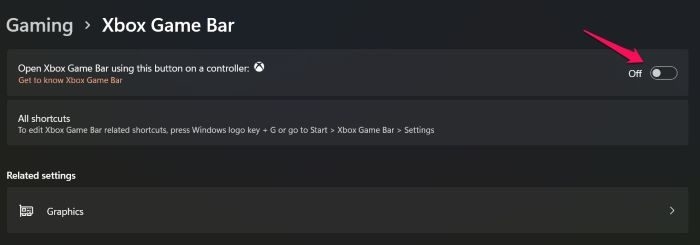
Reports suggest that Xbox Game Bar and Overlay can conflict with Star Citizen. To test this:
- Open Settings.
- Navigate to Gaming > Xbox Game Bar and turn off the toggle.
- Return to Gaming and select Captures.
- Turn off recording and audio capturing.
Try playing again to see whether the crashes stop.
Update graphics drivers
Keep both integrated and dedicated GPU drivers current to improve performance and address unexpected crashes. Available update methods include:
- Downloading Driver and Optional Updates.
- Getting the driver from the manufacturer’s website.
- Using free driver update software.
Restart the computer after updating, then check the game again.
Increase the paging file size
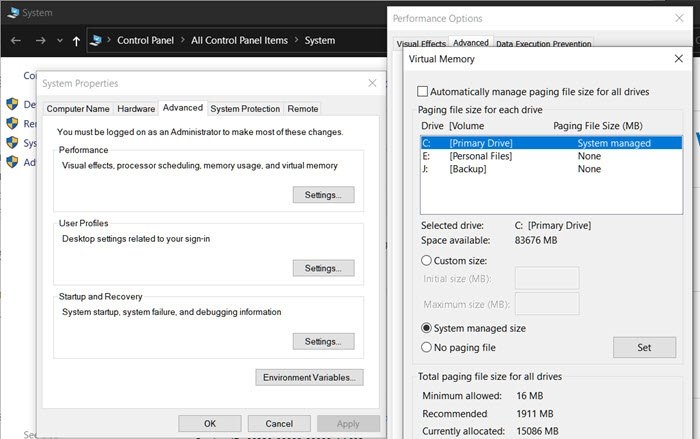
A paging file that is too small can cause Star Citizen to crash. Adjust it as follows:
- Open File Explorer.
- Right-click This PC and choose Properties.
- Select Advanced system settings.
- Under Performance, click Settings.
- Choose Advanced > Change in the Virtual Memory section.
- Clear “Automatically manage paging file sizes for all drives”.
- Choose Custom size and enter high values for Initial and Maximum size.
Restart the game after making these changes and test it.
Reinstall as a last resort
If none of the preceding fixes work, corrupted game files may be responsible. Uninstall Star Citizen, download a fresh copy and install it again.
Star Citizen system requirements
Confirm compatibility before downloading the game.
Minimum
- Operating System: Windows 11/10 (64-bit)
- Processor: Quad-Core CPU – Intel: Sandy Bridge or later, AMD: Bulldozer or later
- RAM: 16 GB
- GPU: DirectX 11 Graphics Card with 3 GB RAM
- DirectX: Version 11
- Storage: 65 GB available space
Recommended
- Operating System: Windows 11/10 (64-bit)
- Processor: Quad-Core CPU – Intel: Sandy Bridge or later, AMD: Bulldozer or later
- RAM: 16 GB (DDR4)
- GPU: DirectX 11 Graphics Card with 4+ GB Ram
- DirectX: Version 11
- Storage: 65 GB available space
Investigate GPU crashes
If Star Citizen causes a GPU crash, open the game’s installation folder and look for gpu_error.log or gpu.log. These files may contain information that helps identify the problem.
If the logs do not help, update the graphics card drivers or manually download them from the official website and perform a clean installation. You can also test disabling fullscreen optimization, changing the display resolution and adjusting scaling.